Showing posts with label Organization. Show all posts

Thursday, March 8, 2012

Preview Your Many Files

Hi, Welcome back, thanks for your patience. I've been teaching a lot of new material and preparing four new 2 hour classes each week has taken a lot of my time. Not an excuse but an introduction to today's topic. 

I don't know if this information pertains to Mac computers at all so apologies there. On PC's, though, I've noticed that most students do not know how to preview their file contents without opening the files. We genealogists tend to accumulate lots of great information and we spend time filing it neatly in well-structured digital files. The problems arise when we are not quite certain what a file contains.

Opening each file becomes a tedious exercise. Using the search function won't help when the object of our search is a picture and we are looking for a specific one. The search function does not help, either, if the picture is embedded in a Word processing file. So - I want to share how to use Windows Explorer's file preview button.

Your PC's (Mac's, too) have a tool for managing your files and folders. On a Windows PC it's called "Windows Explorer." There are many ways to open this program. If you have Windows 7 there is an icon on the taskbar that looks like a manila file folder: that's it - just click on it to open Windows Explorer. Windows 7, Vista, and XP users can also RIGHT click on the "Start" button and click on "Open Windows Explorer."

You will then need to navigate to the folder with the files you want to preview. Depending on how you filed, these files will either be in the Documents or Pictures areas.
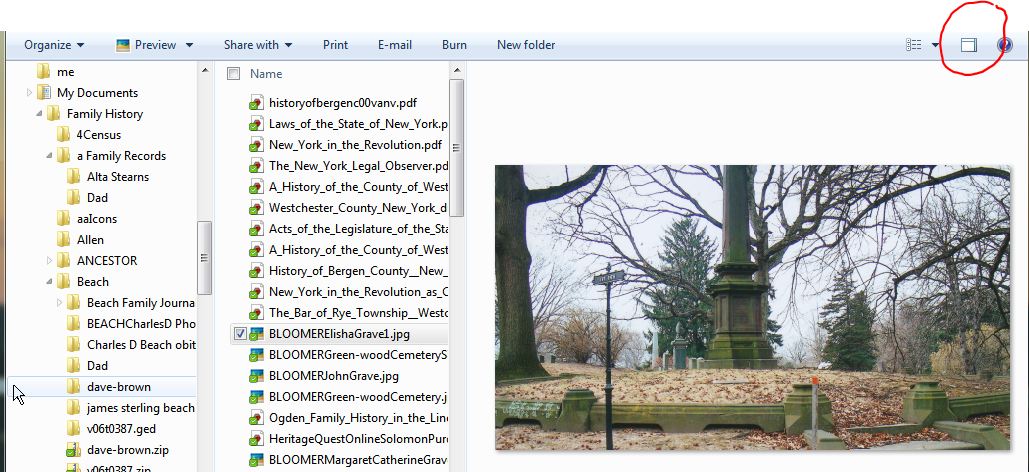
And then click the "show preview pane" button. Then, when you click on a file, you will see the contents of the file. This does not work for all files but it sure helps.


Happy Hunting!


Thursday, August 11, 2011

Building a Better Notebook

Yes, I still use paper for some of my genealogy research but I did find a better notebook system. Levenger.com has had Circa brand notebooks for years but they are really pricey. Staples has a similar system called ARC notebooks. The notebooks come in two sizes: letter (8.5 x 11) and junior – (8.5 x 5.5).

What’s so great about these notebooks? Well, now that they are available at a reasonable price from Staples, they can make note taking in seminars, meetings, and even online much easier. The power of these notebooks is in the binding system. The pages are easy to remove and reposition. You can fold the cover back and have a hard surface to support the pages for note taking when you don’t have a desk to lean on. There are many different paper styles including my favorite: the planner page. Other papers include: to do list, college ruled, and grid. The paper is thick and very smooth making it easier to use both sides without bleed through. There are also dividers, pocket dividers, business card pages, cases, and other inserts available.

What these notebooks excel at is (re)organization. Spiral notebooks only have one type of paper in them. Three ring binders are cumbersome and not suited to taking notes in your lap. Both Levenger and Staples have flexible covers and portfolio covers with slots for loose papers and business cards. Both Levenger and Staples’s notebooks have plain flexible covers or portfolio covers with slots for loose papers and business cards.

Now, when I’m researching one ancestor and come across information on another line, I can just start a new sheet and move that page to the appropriate notebook or section for review when I return home. If I run out of pages in a section, I can add more paper and move on. No more post-its to let me know where the notes are continued. No more torn out clipped in or taped in pages between notebooks. No more transcribing notes into a master notebook. No more fussing with notebooks and sections while I’m researching. I can just grab one notebook and know that it will serve my needs all day no matter what I’m doing.

So, if you like using spiral notebooks and like the pen on paper experience, consider these notebooks. If you prefer the electronic experience …(tomorrow)