Thursday, March 22, 2012

Don’t forget the newbies among us!

Don’t forget the newbies among us! I attended a genealogy special interest group meeting recently and there were some newbies there. Don’t forget to help them along. They may find that they are related to you and may have the records you are looking for. Most of the experienced researchers were very quick to gloss over the “standard” websites we tend to use and I noticed that the newbies were scrambling to write these down.
For those of you who might also be new:


Some of these sites require a subscription for access to all of the data but even those that do have free areas – so don’t count them out.


One of the nicest things about this latest meeting was that we had no speaker, no computer, and no PowerPoint slide show. What we did have was discussion! I don’t recommend this format for every meeting but it was refreshing to get to hear the stories and research tips from each participant. We were also able to access the experience levels of some of the newest participants to help format future meeting segments.

So – this week’s lesson – go to local genealogy meetings and if there isn’t one – START ONE!


Happy Hunting!


Thursday, March 8, 2012

Preview Your Many Files

Hi, Welcome back, thanks for your patience. I've been teaching a lot of new material and preparing four new 2 hour classes each week has taken a lot of my time. Not an excuse but an introduction to today's topic. 

I don't know if this information pertains to Mac computers at all so apologies there. On PC's, though, I've noticed that most students do not know how to preview their file contents without opening the files. We genealogists tend to accumulate lots of great information and we spend time filing it neatly in well-structured digital files. The problems arise when we are not quite certain what a file contains.

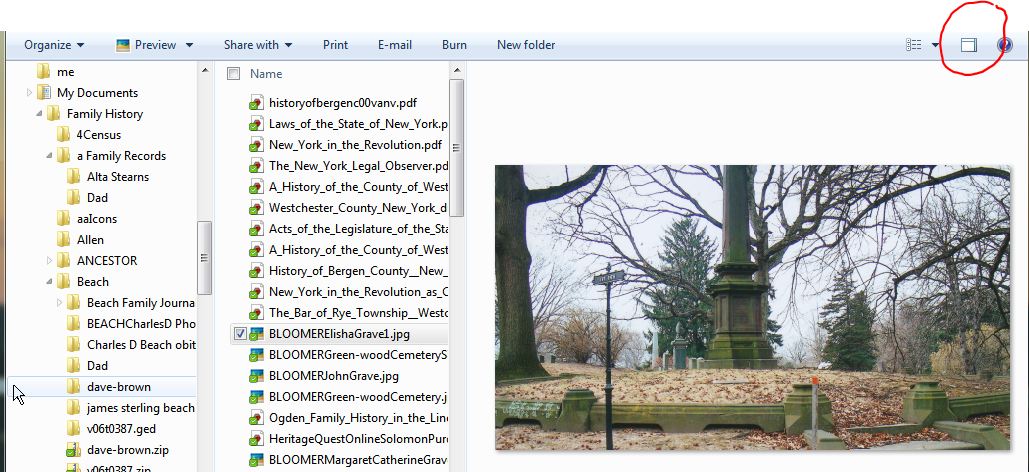
Opening each file becomes a tedious exercise. Using the search function won't help when the object of our search is a picture and we are looking for a specific one. The search function does not help, either, if the picture is embedded in a Word processing file. So - I want to share how to use Windows Explorer's file preview button.

Your PC's (Mac's, too) have a tool for managing your files and folders. On a Windows PC it's called "Windows Explorer." There are many ways to open this program. If you have Windows 7 there is an icon on the taskbar that looks like a manila file folder: that's it - just click on it to open Windows Explorer. Windows 7, Vista, and XP users can also RIGHT click on the "Start" button and click on "Open Windows Explorer."

You will then need to navigate to the folder with the files you want to preview. Depending on how you filed, these files will either be in the Documents or Pictures areas.
And then click the "show preview pane" button. Then, when you click on a file, you will see the contents of the file. This does not work for all files but it sure helps.


Happy Hunting!


Saturday, February 25, 2012

Flash Drives

First, share your research! I had the pleasure of spending time with a cousin that I got re-acquainted with through genealogy. We each had new research since the last time we met. Both of us had backed-up our research results (screen prints, census records, vital records, photos, etc.) on flash (thumb) drives. It was a simple task to copy the folders to each other’s flash drives using our computers. Now, we can each review lines and data that we may not have found on our own.

This brings another hint to mind. I have a bunch of flash drives. Some are physically quite small but all are just large enough for me to paste on a small return address label. This way, if I leave a drive connected to another computer or lose one, I have a chance of seeing it again. I also suggest you put a text file on each drive with your contact information. I call mine “1OwnerInfo.” This way, if someone opens the drive to see what is on it, this file shows up at the top of the list. (I’d be happier if I had a more clever name but this is what I’m using now.)


This brings to mind a caution for those people who might plug their flash drives into PC’s and Mac’s, and tablets. Make sure that you DO NOT format the flash drive with the NTFS format for PC’s. If you do not know what that means, then you are not likely to do it. PC’s can format a disk with two different formats NTFS and FAT32. The NTFS format is not readable on Mac’s and tablets. You can check which format your device is using from the drive properties.


In general, on a PC, the internal hard drives are and should be NTFS drives. Removable hard drives are also better as NTFS drives but flash drives are so portable among operating systems that FAT32 is a better choice.

Well, glad I had a chance to share this with you and thank you for your time.

Happy Hunting!


Thursday, February 16, 2012

Finding Your Roots and other videos

I cannot believe it’s been 2 weeks since I last Blogged here! I apologize and promise to do better in the future. I know how frustrating it is to find a blog and then not get updates.

So – does this mean I have not been doing any genealogy research? NO! I’ve been catching up on the new season of “Who do you think you are” and awaiting a new program on PBS with Henry Louis Gates Jr. This PBS host is the best so don’t miss it!

This is a new 10 part series starting March 25th called “Finding Your Roots.” See a preview (33 seconds) at http://video.pbs.org/video/2189457832

I’ve also been catching up on the many new webinars at http://www.legacyfamilytree.com/webinars.asp

The people at Legacy Family Tree have a webinar on March 7th on preparing for the April 2nd release of the 1940 census. I’ve blogged on this topic previously and don’t want you to miss this webinar. If you cannot watch it on the 7th it will be available for free online for the 10 days after that date and the purchase price is very reasonable if you miss the free period.

Our Grand Strand Genealogy Club had a great presentation on how to prepare for the 1940 census release. Gail Reynolds is our resident expert and leads classes for the local Osher LifeLong Learning Institute (OLLI.) So – if you are not lucky enough to have Gail in your neighborhood, maybe you have an OLLI program in your town with genealogy classes.

A list of Institutes is available at: http://www.osherfoundation.org/index.php?olli_list

This is a great program for adult education. The classes offered differ by school but since genealogy is one of the fastest growing hobbies, there are probably classes available near you. If there is an OLLI near you and they don’t have genealogy classes, then you should think about teaching one! I’ve found that all of the genealogists I’ve met have lots of information to share about the process of finding ancestors.

Our genealogy club has a website and blog. The website is at: http://www.rootsweb.ancestry.com/~scgsgc

And the tips blog is at: http://gsgc-tandt.blogspot.com/

This should keep you all busy until next week!

Thanks for your time.

Happy Hunting!

Thursday, February 2, 2012

Go to RootsTech 2012 virtually

Get on Rootstech.org as soon as you finish reading this notice. In fact, forget me, go there now! (Don’t forget to come back, please.)

RootsTech 2012 is the technology genealogy conference that is happening NOW in Salt Lake City, Utah. This conference is from Feb 2-4. The website has the syllabi for every scheduled session. Often each syllabus is a complete outline of the topics for each session – complete with websites and book titles for your research. The guide is also available there so you can see what we are missing. These are both .pdf downloads and are free.

Some of the session are streaming LIVE. I participated in the “Genealogy Idol” session and have 2 full pages of notes on technology and favorite websites and blogs of the four Idol contestants. If you see a session you are interested in on the full list and RootsTech is not streaming it, there is a chance that the sponsor of the session is! Go to the sponsor's website and search for the session name or RootsTech. That's how I was able to watch the "Genealogy Idol" session.
There are also constant Twitter feeds at #rootstech. There are also iPhone/iPad, Android, and Blackberry apps if you happen to be there and want to schedule your conference sessions.

Go to Rootstech.org (not .com) and the first page has the live sessions. If you go there and no session is currently running, you will see one of the welcome sessions. Don't forget to scroll down to see the other resources including the downloads.
I could not find the list of live sessions on the website for the conference but Eastman had it.(of course) The times are Mountain Standard Time

Friday, February 3

·         8:30-9:30 am, Exabyte Social Clouds and Other Monstrosities (Keynote Address) by Josh Coates

·         9:45-10:45 am, Publish Your Genealogy Online by Laura G. Prescott

·         11:00 am-12:00 pm, Optimize Your Site for Search Engines by Robert Gardner

·         1:45-2:45 pm, Genealogists “Go Mobile” by Sandra Crowly

·         3:00-4:00 pm, Google’s Toolbar and Genealogy by Dave Barney


Saturday, February 4

·         8:30-9:30 am, Making the Most of Technology to Further the Family History Industry (Keynote Address) by Tim Sullivan and Ancestry.com Panel

·         9:45-10:45 am Genealogy Podcasts and Blogs 101 by Lisa Louise Cooke

·         11:00 am-12:00 pm, Future of FamilySearch Family Tree by Ron Tanner

·         1:45-2:45 pm, Privacy in a Collaborative Environment by Noah Tatuk

Happy Hunting!

Don’t forget to go to Rootstech.org  - the laundry, dusting, errands, lawn, etc can wait!


Friday, January 27, 2012

Maybe, just maybe a Rose isn’t a Rose

Maybe, just maybe a Rose isn’t a Rose. She might be a Rosario. William could be Bill or Bud or Buddy or Wm. John could be Jno, Jonathan, Joh…. Thomas – well that’s Tom or is it? I’ve seen Tho, Thos. Well, you get the picture.

When searching for your ancestors sometimes even knowing their names does not seem to help! It depends on who recorded the records. I found a website (and I’m sure there are others) that has a list of alternates for names. http://www.censustrail.com/ctrail/abbreviations.php

http://amberskyline.com/treasuremaps/x-prop.html also shows how some of these names appear in script in the records.

Finding your female ancestors can be even more difficult. Many women of Catholic European heritage were named Mary something and spent their whole lives being known by their middle names. The only records that would have their Christian names are the birth, marriage, or death records – just the ones you are looking for!

Another problem I’ve found with searching for women in newspapers is the more formal naming patterns. Many of my ancestors’ newspaper records show the women as nothing other than Mrs. Jones or Mrs. Parker or, if I’m really lucky, Mrs. James Parker.

Don’t forget that some of your immigrant ancestors may still use the “foreign” given name they were born with. Lewis could be in the very record you are looking at but he’s listed as Ludwig. Rootsweb has a great chart for researching foreign names across multiple countries and shows the name in different languages: http://www.rootsweb.ancestry.com/~scoconee/names.html

The results are shown as .pdf files and you will need Adobe Acrobat Reader (or similar software) in order to read the results.

Don’t give up!


Happy Hunting!

Wednesday, January 18, 2012

Genealogy Research on Sale Today


Genealogy is on sale.

Family Tree Magazine 10 year archive on DVD is down to $50


How about fold3.com for $49.95 instead of $79.95 until the end of the month!

Celebrate Fold3's 5th Anniversary with a
Special Limited-Time Offer.

Join Fold3 today and Save $30


I did not want you to miss these great opportunities. Don’t forget that GenealogyBank.com provides a full 30 day trial.

Happy Hunting!